







Your New Southern Account Is Just the Beginning

At Southern Bank, we take your finances personally. These resources will help you set up your new account and start seamlessly managing your money. If you have any questions or need guidance on what’s next, we’re always here to help.

Banking That Grows With You

Whether you’re managing everyday expenses, saving toward a specific goal, or just starting out on your own financial journey, you’ll find the tools and support you need right here.

Below, you’ll find guidance on how to set up:

Online and Mobile Banking

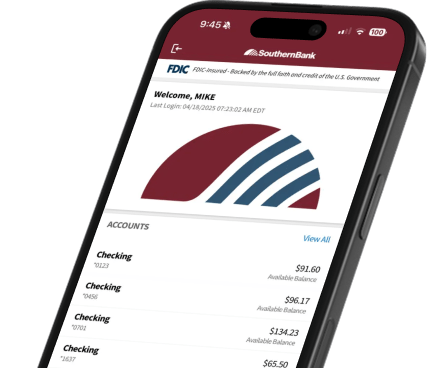
Your new Southern Bank account comes equipped with handy digital tools to help you bank when and where it works best for you.

Set Up Your Digital Banking Account

Get the Southern Bank App

Your New Card

Let’s get your new debit card ready. Just follow a few easy steps to activate your card and you can start spending your way, right away.

Call 1.855.275.7226 during operating hours and follow the automated card activation instructions.

Operating hours:
Mon-Fri: 8:00am-7:00pm / Sat: 9:00am-1:00pm
OR

Log into your Southern Bank online account or mobile app.

  • If you haven’t set up your account yet, you can do so here.
  • Find “Card Management” in the Menu.
  • Select “Activate Card.
  • Enter your information and confirm your identity.
  • Select “Confirm Activation.”

Your debit card may take up to two weeks to fully activate, so be sure to plan for contingencies in the event of delays or disruptions. If you opened your account in person, your card may already be activated and ready to use.

Advanced Banking Tools

Your checking account comes with a suite of premium features to help you stay organized and in control of your finances.

My Dashboard

Connect your bank accounts, investments, mortgage, loans, and more. You’ll be able to easily monitor your activity, including spending, budgeting, and savings.

Bill Pay

Never miss a due date again. You can schedule one-time or recurring payments with the tap of a button.

Zelle® Compatibility

Instantly send and receive funds from any bank account.
Mobile Deposits

No time to make it to your nearest branch? Snap a picture of your check and instantly deposit it from anywhere.


Enhanced Security Features

Every Southern checking account comes equipped with features to keep you — and your money — safe.

Card locks

Instant, personalized control over your debit card that you can disable or restrict from your digital account.

Payment card protection

Automatically guard against unauthorized card charges, offering peace of mind and quick resolution in case of fraudulent activity.

Identity recovery and restoration

Expert assistance to rebuild and restore your identity, minimizing lost time and effort.

Identity and credit monitoring (activation required)

Booster your account’s defences by receiving alerts of suspicious activity — so you can act fast before issues escalate.

Personal identity protection up to $5,0001,2

Financial coverage for qualified expenses related to identity theft so you can recover with confidence.

1Cell phone protection and identity theft benefit are subject to additional terms and conditions. Participating merchants on BaZing are not sponsors of the program, are subject to change without notice, may not be available in all regions, and may choose to limit deals.
2Insurance products are: NOT A DEPOSIT. NOT FDIC-INSURED. NOT INSURED BY ANY FEDERAL GOVERNMENT AGENCY. NOT GUARANTEED BY THE BANK.

Financial Wellness Tools

With the right knowledge and the correct tools at your disposal, you can tackle financial challenges and navigate major purchases with confidence. We put everything you need right at your fingertips, helping you stay secure, save smarter, and even learn about complex personal finance concepts. Financial wellness is a journey, and Southern Bank is with you every step of the way.

Personal Finance Assistance

Explore information, video lessons, and practical tools to help you stay on a solid path forward.

Money Management

Get personalized financial insights that will help you visualize if you're keeping to your budget and making progress toward your goals.

Frequently Asked Questions

What if I don’t use Online Banking?

You don’t have to use Online Banking, but you do have to set it up in order to use our new App. Make sure you are active in your Southern Bank Online Banking by logging in via Southernbank.com from a supported browser at least once every 60 days.

To enroll, you will need your drivers license number and your checking account information. Then click on button above and follow the instructions on that page.

Yes, AFTER you have logged in with your Username and Password and changed the settings to allow biometrics. It may take a few logins before your biometrics (Face or Touch ID) are recognized and usable on your device.

Log in to Mobile App > Click More > Click Settings > Click Quick Access > Turn Off Touch/Face ID. Close App and then reopen and turn the biometrics (Touch/Face ID) back on.

For extra security, a special code is sent to your device the first time you log in. If this code is entered incorrectly or if your credentials are entered incorrectly (remember to use the same credentials as your Online Banking), you will be locked out for 24 hours. After 24 hours, you can attempt again.

You will receive this message until your device is recognized by our Southern Bank Personal mobile app, which may take several login attempts, depending on the device.

The mobile app must have the same Username and Password as your online banking profile. This keeps your account information up to date in both places.

To reset your Password, select the “Password Reset” button at the bottom of the screen. Do not enter your Username. Select the “Reset Your Password?” option in blue, then enter and verify your information. Click continue, and you will receive a one-time security code to change your Password.

The Southern Bank Personal mobile app is compatible with the current and previous 2 versions of both iOS and Android. Check with your device manufacturer for the most current version of their operating system.

In order for you to access your account with the new app, you must have a personal online banking profile. Once you set up online banking, all your info will automatically transfer to the new app and you won’t miss a beat. It only takes minutes to do and will save you big time later.

Contact Us

Whether you have questions about setting up your account or want to plan for what’s next, Southern Bank is always here to support you.
  1. Cell phone protection and identity theft benefits are subject to additional terms and conditions. Participating merchants on BaZing are not sponsors of the program, are subject to change without notice, may not be available in all regions, and may choose to limit deals.
  2. Insurance products are: NOT A DEPOSIT. NOT FDIC-INSURED. NOT INSURED BY ANY FEDERAL GOVERNMENT AGENCY. NOT GUARANTEED BY THE BANK.

Online Banking


Don’t have Online Banking? Sign Up